

Business process automation has evolved through distinct technological phases: mainframe-era batch processing in the 1960s-70s, integrated enterprise software in the 1980s, workflow orchestration tools in the 1990s, and Robotic Process Automation (RPA) in the 2000s. Despite these advances, the fundamental architecture of enterprise automation has remained largely unchanged—database backends, rule-based workflow engines, and per-seat licensing models designed for human operators.
Today’s automation platforms share common limitations:
- Rule-based logic: Workflows rely on predefined conditional statements that cannot adapt to unforeseen scenarios
- Brittle integrations: Point-to-point connections that break when underlying systems change
- Limited context: No persistent memory of past executions or ability to learn from outcomes
- Human-centric design: Built around the assumption that humans will perform the actual work
The emergence of large language models and agentic AI systems presents an opportunity to fundamentally rethink enterprise automation. Rather than building tools for human workers, we can now construct platforms where AI agents are the primary executors. This paradigm shift enables autonomous agents to reason about tasks, collaborate with each other, accumulate knowledge over time, and adapt their behaviour based on outcomes.
The Fuchsia Automation Platform
Fuchsia implements an agent-first automation architecture inspired by Andrej Karpathy’s “LLM Operating System” concept. Instead of orchestrating human tasks, the platform orchestrates autonomous AI agents that execute business processes end-to-end. The system combines multi-agent collaboration, persistent knowledge graphs, and continuous learning mechanisms to create an automation layer that adapts and improves over time.
Architecture Overview
The platform architecture consists of five integrated layers, as illustrated in Figure 1:
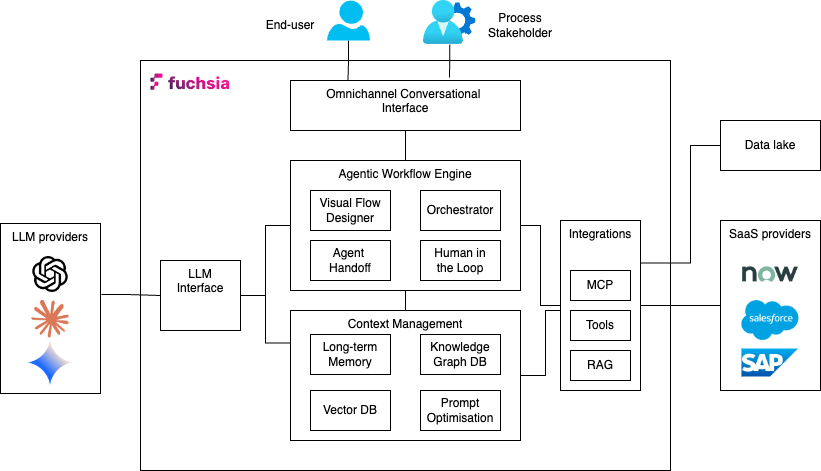
1. Omnichannel Conversational Interface
The user interaction layer supports multiple input modalities—native chat UI, email, API calls, and webhook triggers. All interactions are normalised into a unified request format and routed to the workflow engine. This abstraction allows the same workflow to process requests regardless of origin, eliminating the need for channel-specific logic.
2. LLM Interface Layer
Fuchsia maintains provider-agnostic LLM connectivity, supporting OpenAI, Anthropic, Google, and other model providers through a unified interface. Prompt construction follows a modular, declarative approach where prompt components are assembled programmatically based on task requirements, agent capabilities, and available context. This architecture enables prompt optimisation without modifying workflow logic.
3. Agentic Workflow Engine
The workflow engine executes business processes as directed acyclic graphs (DAGs) where each node represents a task executed by an AI agent. Unlike traditional workflow engines that route tasks to human queues, Fuchsia’s engine:
- Assigns tasks to agent teams: Each workflow execution is paired with an agent organisation that collaboratively completes the tasks
- Injects dynamic context: Task execution incorporates real-time data from knowledge graphs, vector stores, and external systems
- Supports multiple reasoning modes: Agents can execute tasks using direct execution, chain-of-thought reasoning, or ReAct (Reasoning + Acting) patterns
- Enables agent collaboration: Tasks can be delegated between agents based on specialisation and current workload
- Facilitates human escalation: Complex decisions automatically route to human reviewers based on confidence thresholds
4. Context Management System
Context management operates across three subsystems:
Graph Database (Neo4j): Stores episodic memory of workflow executions, entity relationships, and accumulated domain knowledge. The graph structure enables multi-hop reasoning queries like “Find all customers who experienced issue X and were resolved by approach Y within the last quarter.”
Vector Database: Maintains embeddings of documents, historical conversations, and task outcomes for semantic retrieval. Used primarily for identifying similar past situations when agents encounter new scenarios.
Prompt Optimisation Framework: Implements DSPy-based continuous improvement where task prompts are evaluated against metrics and iteratively refined. Training examples, evaluation metrics, and optimisation algorithms (GEPA, MIPRO v2) work together to improve task completion quality over time.
5. External Integration Layer
Agents access external systems through two mechanisms:
Model Context Protocol (MCP) Servers that provide standardised interfaces to external services like email, HR systems, and databases. MCP servers expose tools that agents can invoke during task execution.
REST APIs the provide direct HTTP integration for systems without MCP support. API responses are parsed and incorporated into agent context for decision-making.
User Experience
Fuchsia provides a hybrid interface that combines traditional UI navigation with conversational AI and visual workflow design. This multi-modal approach accommodates different user preferences and task types—quick actions via chat, detailed configuration via visual tools, and structured navigation for administrative functions.
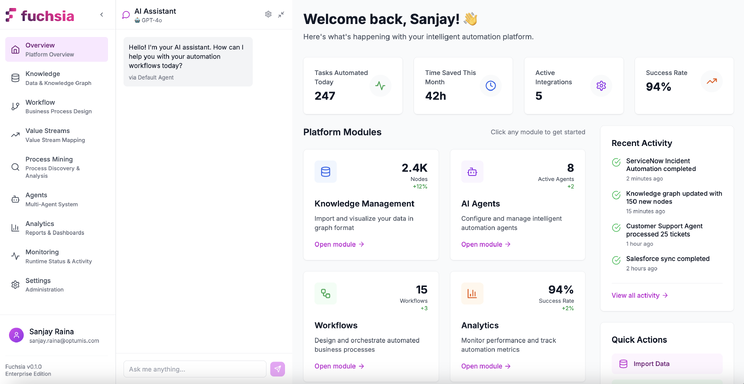
AI-Assisted Chat Interface
The conversational interface functions as a co-pilot for workflow development and optimisation. The system maintains context awareness of the user’s current task—whether designing a workflow, analysing process metrics, or monitoring executions—and provides role-appropriate assistance.
For example, when a process designer selects the workflow editor, the chat interface can:
- Generate workflow templates from natural language descriptions
- Suggest optimal task sequences based on similar processes
- Identify potential bottlenecks or failure points
- Recommend appropriate agent organisations for the workflow type
The generated workflows render immediately on the visual canvas, where they can be refined through continued conversation or direct manipulation.
Visual Workflow Designer
The drag-and-drop interface enables declarative workflow construction without coding. Each workflow consists of task nodes connected by edges representing execution flow. Task nodes are configured with clear specification of objectives, completion criteria and expected outputs. The platform converts the task configuration into appropriate prompts and context for the LLM workflow engine to execute.
Task configuration also includes continuous prompt/context optimisation. Few-shot examples can be provided to evaluate the output of tasks against using predefined metrics. The continuous refinement and optimisation of the task context produces better outputs over time and results in truly intelligent execution of workflow tasks by AI agents.
Task execution can also use memory persistence to accumulate knowledge acquired from task outputs and interactions. The ability to capture historical data in a knowledge memory graph provides AI agents with additional insight and reasoning when excuting tasks.
Memory Integration:
The workflow designer can also configure the memory capability of workflows:
- Knowledge Graph Storage: Whether task outcomes should be persisted as entities and relationships
- Retrieval Scope: Which historical data the agent should consider during execution
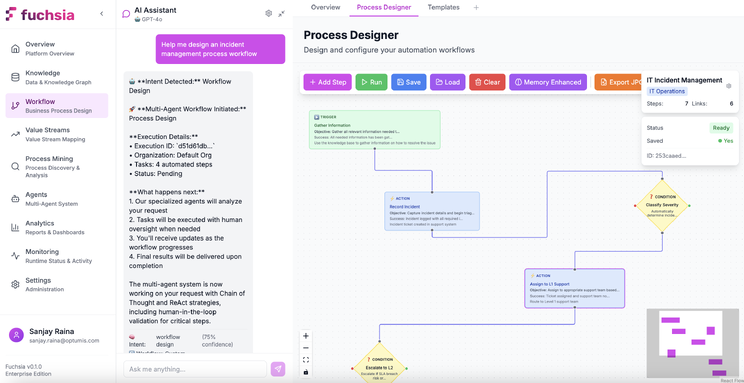
The interface supports both conversational workflow generation (“create a workflow for processing refund requests”) and direct manipulation (dragging task nodes, editing properties, connecting flow edges). This flexibility allows rapid prototyping via chat followed by detailed refinement using visual tools.
Workflows
Workflows represent the structural definition of business processes. A workflow template specifies the task sequence, data flow, and decision logic that governs process execution. At runtime, the platform instantiates workflow executions—stateful instances tracking progress through the task DAG.
Workflow Templates vs Executions
Workflow Templates are reusable process definitions that specify:
- Task nodes and their configuration (objectives, completion criteria, evaluation metrics)
- Edges defining execution order and conditional branching
- Input schema defining what data initiates the workflow
- Output schema defining what data the workflow produces
Workflow Executions are runtime instances of workflows that maintain:
- Current execution state (which tasks are in-progress, completed, or blocked)
- Accumulated context data from completed tasks
- Agent assignments for each task
- Execution history and decision audit trail
Task Configuration Deep Dive
Each task node contains rich metadata that transforms it from a simple execution step into an intelligent, self-optimising unit. Figure 4 illustrates the task configuration interface:
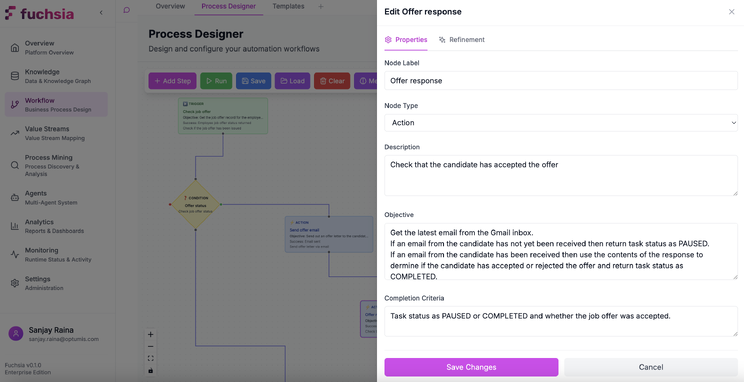
Task configuration operates at three levels:
Execution Layer (what the agent does):
- Task Objective: Natural language goal statement specifies what the agent should achieve(“Analyse customer sentiment from support ticket”)
- Completion Criteria: Specific conditions for successful completion (“Sentiment classification with confidence > 0.85”)
- Input Schema: Required data format from previous tasks
- Output Schema: Expected data structure for downstream tasks
Evaluation Layer (how we measure success):
- Training Examples: Few-shot sample demonstrations of correct task completion
- Metrics: Programmatic functions scoring task outputs to assess task performance (accuracy, completeness, latency)
- Optimisation Settings: Algorithms (GEPA, MIPRO v2) and hyperparameters for prompt tuning
Learning Layer (how the task improves):
- Memory Persistence: Whether to store task outcomes in the knowledge graph
- Optimisation Schedule: How frequently to run prompt optimisation
- Optimisation Algorithm: Which DSPy optimiser to use (MIPRO v2 leveraging instructions and examples , GEPA for natural language self-reflection of prompt itself)
Agent Organisations
Agent organisations define the AI workforce structure that executes workflows. Like human organisational charts specify reporting relationships and specializations, agent organisations define collaboration patterns, skill distributions, and handoff protocols between AI agents.
Agent Architecture
Each agent operates as an autonomous execution unit with reasoning capability and the ability to leverage skills.
Reasoning Strategy defines the cognitive approach that the agent employs:
- Direct Execution: Immediate LLM inference without intermediate reasoning steps (lowest latency, suitable for straightforward tasks)
- Chain-of-Thought (CoT): Step-by-step reasoning where the agent articulates its logic before producing outputs (better for complex analysis)
- ReAct: Iterative reasoning-action cycles where the agent alternates between thinking and tool use (optimal for tasks requiring external data integration)
Each agent has a Skill Set that comprises tools and capabilities available to the agent:
- Native Functions: Python functions for structured data manipulation, calculations, and business logic
- MCP Servers: Connections to external services (email, databases, CRM systems) following the Model Context Protocol standard
- Custom Tools: Organisation-specific integrations defined as callable functions
Additionally, agents have access to Knowledge Scope that includes the information available to the agent It includes:
- Workflow Context: Data from previous tasks in the current execution
- Episodic Memory: Historical workflow executions stored in the knowledge graph
- External Knowledge: Data retrieved via RAG from vector stores or graph traversal
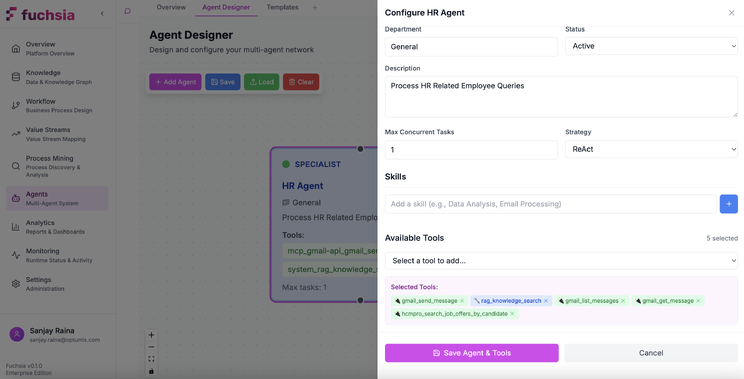
Agent Organisation Templates
Agent templates are graphs where nodes represent agents and edges represent potential task handoffs. When a workflow execution begins, the system instantiates an agent organisation by assigning specific agent instances to each node.
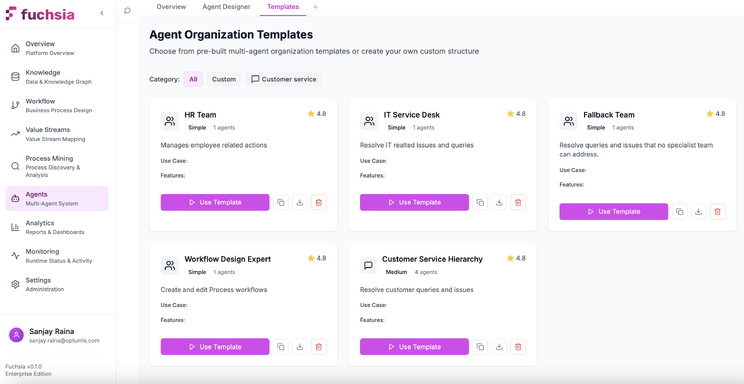
Agent templates support several common patterns:
- Sequential Processing: Tasks flow through a series of specialists (triage → analysis → resolution)
- Parallel Execution: Multiple agents work simultaneously on independent subtasks (data gathering, validation, formatting)
- Hierarchical Delegation: A coordinator agent distributes work to specialists and aggregates results
- Peer Collaboration: Agents of equal capability share workload and cross-check their outputs
Agent Types and Roles
Agents can be configured for specific organisational functions:
- Coordinators route requests to appropriate specialists, aggregate results from parallel tasks, manage workflow state
- Specialists execute domain-specific tasks (sentiment analysis, data transformation, compliance checking) with deep expertise in particular areas
- Validators verify outputs against quality criteria, check for policy violations, ensure data completeness
- Human Liaisons agents manage human-in-the-loop interactions, format approval requests, process human feedback
- Tool Executors interface with external systems, handle API calls, manage data transformations between systems
Context Engineering in Fuchsia
An effective Agentic AI system relies on high quality context data. Fuchsia implements a multi-layered context system that combines episodic memory, semantic retrieval, and structured knowledge to provide agents with relevant information at task execution time.
Agentic Memory System
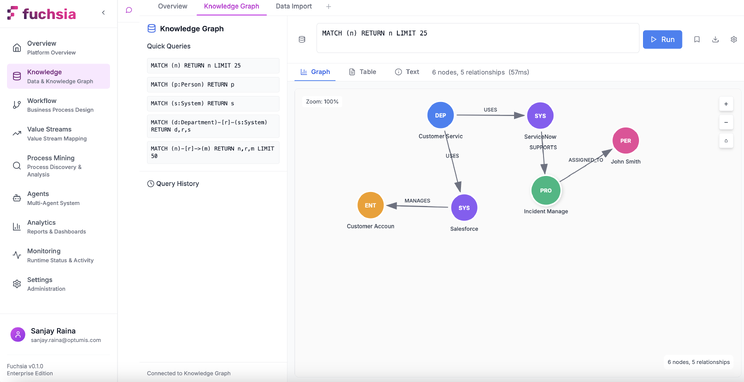
The memory architecture uses Neo4j to maintain a persistent knowledge graph representing workflow history, entity relationships, and accumulated domain knowledge. Unlike vector-only approaches that lose relational structure, the graph preserves entity connections and enables reasoning about relationships.
Episodic Memory Storage models workflow execution as a subgraph containing:
- Task nodes with execution metadata (start time, duration, agent assignment, outcome)
- Entity nodes extracted from inputs and outputs (customers, products, tickets, documents)
- Relationship edges describing how entities interacted during the process
- Temporal markers enabling time-based queries
Entity Extraction and Linking: As workflows execute, the system extracts named entities from unstructured data and links them to existing graph nodes. For example, processing a support ticket creates nodes for the customer, product, issue category, and resolution approach, then connects them to the ticket entity and the broader knowledge graph.
Temporal Knowledge Evolution: The graph tracks how entity attributes change over time. A customer entity accumulates interaction history, preference updates, and issue resolution patterns. Agents query this temporal data to understand context: “What issues has this customer reported in the past six months?”
Multi-Hop Reasoning Support: Graph queries can traverse multiple relationship types to answer complex questions:
- “Find customers who experienced billing issues that were resolved via refund”
- “Which products have quality problems that correlate with specific suppliers?”
- “What resolution approaches work best for priority customers with technical issues?”
These queries inform agent decisions during workflow execution. When an agent encounters a support ticket, it queries the graph for similar historical cases and their outcomes, incorporating that knowledge into its reasoning.
GraphRAG: Hybrid Retrieval Architecture
Retrieval Augmented Generation is another key feature of Agentic AI systems where LLMs can connect to external, authoritative knowledge bases, allowing them to pull in current and specific information before generating answers, instead of relying solely on their pre-trained data. Fuchsia implements GraphRAG—a retrieval architecture that combines semantic vector search with graph traversal to provide richer context than either approach alone. The retrieval process operates as follows.
- Vector Search: When an agent needs external knowledge, the system first performs semantic similarity search against embedded documents in the vector store. This identifies text chunks semantically related to the current task.
- Entity Extraction: The system extracts entities from the retrieved chunks and from the current workflow context.
- Graph Expansion: Starting from identified entities, the system traverses the knowledge graph to find related entities and relationships. For example, finding a customer entity triggers traversal to related products, past issues, and resolution patterns.
- Context Aggregation: Both the semantically similar text chunks and the graph-traversed structured data are combined into a unified context that provides both unstructured information and relational structure.
The Graph-RAG approach has a number of technical advantages:
Multi-Hop Reasoning: Graph traversal enables queries that span multiple relationship types. A question like “What products purchased by enterprise customers in Q4 experienced quality issues?” requires traversing customer→purchase→product→issue relationships, which pure vector search cannot represent.
Explainable Retrieval: Graph paths provide audit trails showing how information was retrieved. Rather than opaque similarity scores, the system can explain: “This recommendation comes from customer C123’s past issues (relationship: REPORTED) with product P456, resolved via method M789 (relationship: RESOLVED_BY).”
Domain Structure Preservation: Entity relationships encode domain semantics that vector embeddings cannot capture. The relationship between “invoice” and “payment” differs from “invoice” and “customer,” and graph structure preserves these distinctions.
Agent Tools and External Integration
Agents extend their capabilities through tools—callable functions that interact with external systems, perform computations, or access data sources. Fuchsia supports tool integration via the Model Context Protocol (MCP) for standardised connections and direct REST API integration for custom systems.
MCP Servers are standalone processes that expose standardised tool interfaces following the Model Context Protocol specification. Each MCP server provides:
- Tool Definitions: JSON schemas describing available functions, required parameters, and return types
- Execution Handlers: Code that processes tool invocations and returns results
- Authentication: Credential management for secure system access
Native Python Tools include custom functions defined directly in the platform, useful for:
- Data transformations (parsing, formatting, validation)
- Business logic calculations (pricing, scoring, compliance checks)
- Internal system operations (database queries, cache management)
The tool invocation flow can be summarised as follows:
- Agent determines a tool is needed based on task requirements
- Agent constructs tool call with appropriate parameters
- System validates parameters against tool schema
- Tool executes and returns structured result
- Agent incorporates result into its reasoning and proceeds
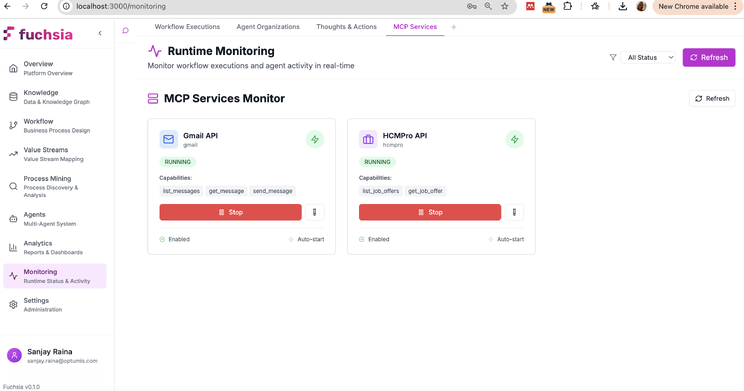
The diagram shows integration with email services and HR management systems. From an agent’s perspective, sending an email or querying employee data requires the same tool invocation pattern—only the tool name and parameters differ.
Agent Handoff Protocol
Agent handoff enables task delegation between agents with different specialisations. This mirrors human organisational patterns where generalist agents triage work and escalate to specialists when needed.
Handoffs occur when an agent determines it cannot optimally complete a task due to:
- Missing tools: The task requires system access the current agent lacks
- Low confidence: The agent’s reasoning indicates uncertainty about the correct approach
- Explicit routing: The workflow design specifies handoff conditions (e.g., “escalate refund requests > $500 to manager agent”)
Agent handoff follows a consistent process where the context is clearly specified and the target agent identified before passing control over. Typically, the process consists of:
Context Packaging: The source agent bundles relevant information:
- Task objective and completion criteria
- Work completed so far
- Entities and data extracted
- Reasoning trace explaining why handoff is needed
Target Selection: The system identifies candidate agents based on:
- Required tools and skills
- Agent specialisation tags
- Current availability and load
- Historical performance on similar tasks
Transfer Execution: Control passes to the target agent with full context preservation
Result Return: When the specialist completes the task, results flow back to the originating agent (if workflow structure requires it) or directly to the next workflow task
This pattern enables progressive specialisation—simple requests are handled by generalist agents, complex cases automatically route to experts.
Human-in-the-Loop Integration
Not all decisions can or should be fully automated. Fuchsia provides structured human-in-the-loop (HITL) capabilities that enable agents to request human input when needed while maintaining full automation for routine tasks. Human intervention can be invoked in various cases.
Escalation Triggers: Automation workflows and tasks are usually triggered by human interaction, where a user is expecting to accomplish a business function or fulfil a request.
Confidence Thresholds: During task execution, when an agent’s confidence score for a decision falls below configured thresholds, the task automatically escalates to a human reviewer. For example, a refund decision with 65% confidence might require approval if the threshold is set at 75%.
Policy Requirements: Certain task types mandate human oversight regardless of confidence. High-value transactions, contract modifications, or compliance-sensitive operations can be configured to always require human approval.
Exception Conditions: Unexpected scenarios that don’t match known patterns trigger escalation. For example, an agent processing invoices that encounters an unusual format or missing required data will pause for human guidance.
A typical human-in-the-loop workflow operates as follows:
- Escalation Initiation: Agent determines human input is needed and packages a request containing:
- Context explaining why escalation occurred
- Work completed so far
- Specific decision or input required
- Recommended action (if agent has a suggestion)
2. Human Notification: The system routes the request to appropriate personnel based on:
- Role-based access control (managers, subject matter experts, compliance officers)
- Availability and current workload
- Domain expertise matching the request type
3. Human Response: The reviewer examines the context and provides:
- Decision/approval
- Additional information
- Correction to agent reasoning
- Instructions for proceeding
4. Workflow Resumption: The agent incorporates human input and continues execution
The technical implementation of HITL capability requires integration with other collaboration and communication tools.
Real-Time Communication: WebSocket connections enable bidirectional communication between agents and human users. Escalation requests appear instantly in the user interface without polling delays.
Mobile Support: HITL requests can be reviewed and approved via mobile devices, enabling quick response times for time-sensitive decisions.
Audit Trail: All human interactions are logged in the knowledge graph with timestamps, decision rationale, and outcome data. This provides compliance documentation and training data for improving agent performance.
Prompt Optimisation with DSPy
Task execution quality depends heavily on prompt quality. Rather than manually tuning prompts through trial and error, Fuchsia implements automated prompt optimisation using DSPy—a framework that treats prompts as learnable parameters optimised against metrics.
At task execution time, the optimisation system constructs prompts by assembling:
- Task objective and completion criteria (from workflow template)
- Few-shot examples (if configured)
- Retrieved context (from knowledge graph or vector store)
- Agent capabilities and available tools
- Input data from previous tasks
These components are compiled into a prompt template that instructs the LLM how to complete the task. As workflows execute, the system collects performance data—task outputs, execution times, success rates, and metric scores.
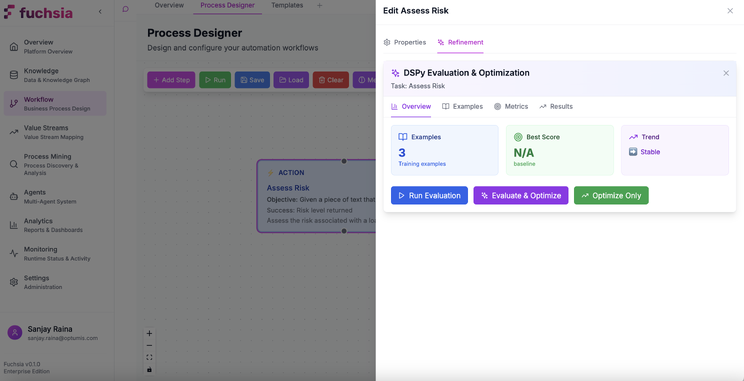
Training Examples: Process designers provide sample inputs and expected outputs that demonstrate correct task completion. These serve as optimisation targets—the system tunes prompts to reliably produce outputs matching the examples.
Evaluation Metrics: Programmatic functions that score task outputs. Metrics can measure:
- Accuracy (does the output match expected results?)
- Completeness (are all required fields populated?)
- Consistency (do similar inputs produce similar outputs?)
- Latency (how quickly does the task complete?)
Optimisation Algorithms: DSPy provides several optimisers:
MIPRO v2 (Multi-stage Instruction Proposal Optimiser): A sophisticated approach that generates multiple prompt variations, evaluates them against metrics, and selects the best performers. It is designed to optimise both the natural language instructions (prompts) and the few-shot examples used by an LLM program, often using techniques like bootstrapping and Bayesian optimisation.
GEPA (Genetic Pareto Prompt Optimiser): Uses an approach called “reflective prompt evolution”. Instead of relying purely on structured feedback and few-shot examples, GEPA enables LLMs to introspect and reflect on their own execution traces and evaluation results in natural language to diagnose errors and propose improvements.
The system runs optimisation periodically (e.g., weekly) or when performance degrades below thresholds. Over time, prompts become increasingly effective at their specific tasks, similar to how human agents improve with experience.
Process Management
Beyond workflow orchestration, Fuchsia provides additional process management capabilities that help organisations understand, optimise, and govern their business processes. These modules leverage the same core agentic architecture and context management system.
Process Mining
Process mining reconstructs actual process execution patterns from event logs, enabling data-driven process understanding and optimisation. Unlike workflow templates that define how processes should work, process mining reveals how they actually work in practice. The core capabilities of the Process Mining subsystem are as folllows.
Process Discovery: The system ingests event logs from source systems (ERP, CRM, ITSM tools) containing:
- Case ID (uniquely identifies a process instance, e.g., order number)
- Activity (what happened, e.g., “order received,” “payment processed”)
- Timestamp (when it happened)
- Optional attributes (who performed it, what data changed)
From these logs, the system constructs process graphs showing:
- Activity sequences and their frequencies
- Parallel execution paths
- Decision points and branching logic
- Cycle times for each activity
Conformance Checking: Compares discovered process models against reference workflows to identify deviations:
- Activities executed out of sequence
- Missing required steps
- Unauthorised shortcuts
- Compliance violations
Process Enhancement: Analyses discovered models to identify optimisation opportunities:
- Bottlenecks where work queues up
- Rework loops indicating quality issues
- Resource allocation inefficiencies
- Automation candidates (high-volume, repetitive activities)
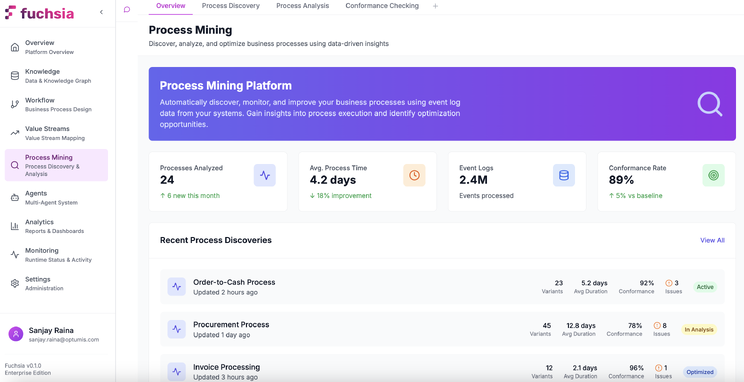
The Process Mining interface enables process analysts to:
- Configure event log connections to source systems
- Visualise discovered process models as flow diagrams
- Identify bottlenecks highlighted by colour-coded activity metrics
- Compare conformance between actual and expected processes
- Export insights for workflow optimisation
Value Stream Management
Value stream mapping identifies value-adding and non-value-adding activities in end-to-end business processes. Unlike process mining (which analyses what happens), value stream management focuses on cycle time, wait time, and handoff delays to optimise throughput and minimise waste.
A value stream map visualises:
- Process Steps: Activities that transform inputs into outputs
- Wait Times: Delays between activities (queuing, waiting for approval)
- Cycle Times: How long each activity takes to complete
- Information Flows: How data and instructions move between steps
- Material Flows: How physical or digital artifacts progress through the process
Current State Mapping documents existing processes with actual metrics:
- Lead time (total time from request to completion)
- Process time (actual work time)
- Wait ratio (wait time / total time, highlighting inefficiency)
Future State Design proposes optimised processes that:
- Eliminate non-value-adding steps
- Reduce handoffs and batch processing
- Automate repetitive tasks
- Parallelise independent activities
Gap Analysis compares current and future states to prioritise improvements by impact.
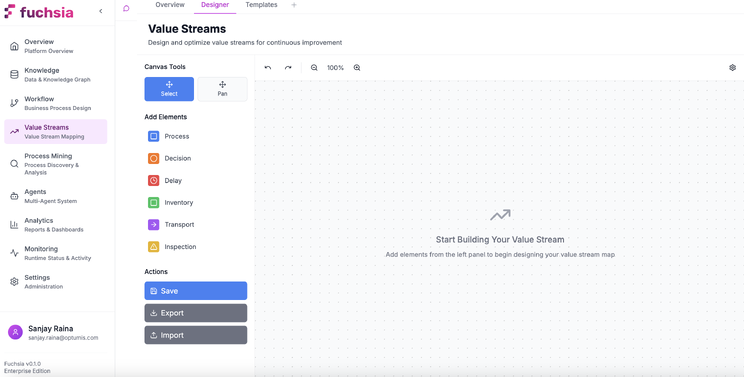
The AI-assisted Value Stream Mapping interface enables:
- Natural language description of value streams (“map our order-to-cash process”)
- Automatic calculation of metrics from process data
- Identification of bottleneck steps with high wait ratios
- Generation of future-state recommendations
Analytics & Monitoring
Fuchsia provides real-time observability into workflow executions and agent behaviour, enabling process managers to monitor performance, diagnose issues, and identify optimisation opportunities.
Live Workflow Monitoring
The monitoring interface provides visibility into active workflow executions, displaying:
Workflow State: Current execution progress showing:
- Which tasks are completed, in-progress, or pending
- Agent assignments for each task
- Execution timeline with task durations
- Data flowing between tasks
Agent Reasoning Transparency: For each task, the system exposes:
- Agent’s reasoning trace (chain-of-thought steps)
- Tool invocations and their results
- Confidence scores for decisions
- Handoff rationale (if task was delegated)
Performance Metrics:
- Task completion times (vs. historical averages)
- Success/failure rates by task type
- Agent utilisation (how busy each agent is)
- Bottleneck identification (tasks with high wait times)
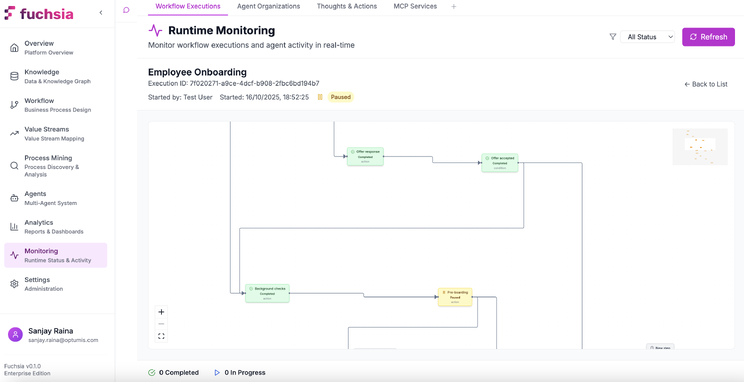
This transparency serves multiple purposes:
- Debugging: Understand why a workflow failed or produced unexpected results
- Optimisation: Identify slow tasks or overloaded agents
- Compliance: Provide audit trails showing decision rationale
- Training: Help process designers understand how agents interpret their instructions
Metrics and Reporting
Beyond real-time monitoring, the analytics layer aggregates historical execution data to surface trends and patterns:
Workflow Performance Metrics:
- Throughput (executions per hour/day)
- Success rate (% of workflows completing without errors)
- Average cycle time (from initiation to completion)
- SLA compliance (% meeting defined time thresholds)
Agent Performance Analysis:
- Task completion rates by agent type
- Quality scores (based on evaluation metrics)
- Handoff frequency (how often agents escalate)
- Learning curves (improvement over time via prompt optimisation)
Operational Insights:
- Peak load times requiring additional capacity
- Common failure modes and their root causes
- Underutilised agents or skills
- Cost metrics (LLM API costs per workflow type)
Core Technology Stack
Fuchsia’s architecture is built on modern, scalable technologies selected for performance, reliability, and maintainability.
Backend Infrastructure:
- Python FastAPI: Asynchronous API framework providing sub-200ms response times
- Celery: Distributed task queue for background processing
- Docker: Containerisation enabling horizontal scaling and consistent deployments
Data Layer:
- Neo4j: Graph database storing episodic memory, entity relationships, and knowledge graphs
- Vector Store (Pinecone/Weaviate): Embedding storage for semantic retrieval
- Redis: Caching layer for session state and frequently accessed data
- PostgreSQL: Relational store for structured workflow metadata
AI/ML Components:
- Multi-LLM Support: Adapters for OpenAI, Anthropic, Google, and open-source models
- DSPy: Prompt optimisation framework with GEPA and MIPRO v2 implementations
- Embedding Models: Dense retrieval models for document and conversation encoding
- Entity Extraction: NER models identifying entities in unstructured text
Frontend Architecture:
- React + TypeScript: Component-based UI with type safety
- WebSocket Client: Real-time bidirectional communication with agents
- React Flow: Visual workflow designer with drag-and-drop capabilities
- D3.js: Process visualisation for mining and value stream modules
Integration Layer:
- MCP Framework: Model Context Protocol server implementations
- REST/GraphQL APIs: Flexible API access patterns
- Webhook Engine: Event-driven integration with external systems
- OAuth 2.0: Secure authentication for third-party connections
Enterprise-Ready Features
Production enterprise deployment requires security, scalability, and integration capabilities beyond core workflow functionality. The Fuchsia platform incorporates security and performance features to provide solutions at enterprise scale.
Security and Compliance
Authentication and Authorisation:
- Multi-Factor Authentication: TOTP-based 2FA for user access
- SSO Integration: SAML 2.0 and OAuth 2.0 for enterprise identity providers
- Role-Based Access Control (RBAC): Granular permissions at workflow, agent, and data levels
- JWT Token Management: Secure, time-limited API access tokens
Data Protection:
- Encryption at Rest: AES-256 encryption for all stored data (database, file storage)
- Encryption in Transit: TLS 1.3 for all network communication
- Secrets Management: Integration with HashiCorp Vault for credential storage
- Data Residency: Configurable geographic data storage locations
Compliance Capabilities:
- Audit Logging: Immutable logs of all workflow executions, agent decisions, and human interactions
- Data Retention Policies: Automated data lifecycle management for GDPR/CCPA compliance
- Consent Management: User consent tracking for privacy-sensitive data processing
- Compliance Reporting: Automated generation of SOC 2, GDPR, and HIPAA compliance reports
Scalability and Performance
Performance Targets:
- API latency: <200ms p99
- Workflow throughput: 1000+ concurrent executions
- Knowledge graph: 1M+ nodes with sub-second query times
- Concurrent users: 1000+ with responsive UI
Scalability Architecture:
- Horizontal Scaling: Stateless API servers enable linear capacity growth
- Database Sharding: Neo4j and PostgreSQL partitioning for multi-tenant isolation
- Caching Strategy: Multi-tier caching (L1: in-memory, L2: Redis) for frequently accessed data
- Async Processing: Background job queues for non-blocking workflow execution
Multi-Tenancy:
- Data Isolation: Per-tenant databases or schema-level isolation
- Resource Quotas: Configurable limits on workflows, agents, and storage per tenant
- Usage Metering: Granular tracking for billing and capacity planning
Integration Ecosystem
Pre-Built Connectors:
- ServiceNow: Incident/problem/change management via REST API
- Salesforce: Lead/opportunity/case automation via SOAP and REST APIs
- SAP: Financial posting and material management via RFC/BAPI
- Workday: Employee onboarding/offboarding via Workday Web Services
- Microsoft 365: Email, calendar, SharePoint document processing via Graph API
Custom Integration Options:
- MCP Server Development: Build custom tools following Model Context Protocol
- REST/GraphQL APIs: Call Fuchsia workflows from external systems
- Webhooks: Subscribe to workflow events for real-time notifications
- Database Connectors: Direct SQL access for data import/export
Fuchsia in Practice
Understanding a complete request lifecycle illustrates how Fuchsia’s components work together to execute business processes.
Request Execution Flow
1. Request Initiation
A user submits a request through any supported channel (chat UI, email, API call, webhook). The system normalises the input into a structured request object containing:
- Request type (new process vs. continuation of existing execution)
- Requester identity and role
- Request content (unstructured text, structured form data, or attachments)
- Context metadata (channel, timestamp, priority)
2. Intent Classification
The intent classifier determines:
- Whether this is a new workflow or continuation of an existing execution (based on conversation history and entity matching)
- Which workflow template matches the request type
- Which agent organisation should handle the execution
- Initial task in the workflow that should receive the request
3. Workflow Instantiation
For new requests, the system:
- Creates a workflow execution instance from the matched template
- Assigns an agent organisation instance
- Initialises workflow state with request data
- Schedules the first task for execution
4. Agent Task Execution
For each task in the workflow:
a. The system performs Context Assembly and gathers:
- Task objective and completion criteria from template
- Input data from previous tasks
- Retrieved knowledge from graph/vector stores
- Agent’s available tools and reasoning strategy
b. Based on its configured strategy Agent Reasoning is performed:
- Direct: Single LLM call with full context
- Chain-of-Thought: Multi-step reasoning with intermediate outputs
- ReAct: Iterative loop of reasoning, tool use, and observation
c. Tool Invocation: If needed, agent calls external systems via MCP servers or APIs
d. Decision Point: Agent determines:
- Task is complete (output meets completion criteria)
- Handoff needed (delegate to specialist agent)
- Human input required (escalate via HITL)
- Retry needed (transient failure, will reattempt)
5. Knowledge Persistence
Upon task completion:
- Extracted entities are added to the knowledge graph
- Relationships between entities are created
- Task outcome is stored as an episodic memory node
- Evaluation metrics are computed for prompt optimisation
6. Workflow Progression
The engine advances to the next task:
- Workflow state updates (mark current task complete, activate next tasks)
- Data from completed task becomes input to downstream tasks
- Process repeats until all tasks are complete
7. Completion and Feedback
When the workflow finishes:
- User receives results via their original request channel
- Knowledge graph updates with full execution trace
- Analytics aggregate performance metrics
- Prompt optimisation scheduler queues tasks that underperformed
Application Domains
Fuchsia’s architecture supports diverse business process automation scenarios across organisational functions. Common use cases include the following.
IT Service Management:
Incident management workflows that:
- Classify incoming tickets using entity extraction and historical pattern matching
- Route to appropriate resolver groups based on skills and availability
- Attempt automated resolution via knowledge base lookup and scripted remediation
- Escalate complex cases to human experts with full context
- Learn from resolution patterns to improve future classification and routing
Customer Service Operations:
Support ticket processing that:
- Aggregates customer context from CRM, order history, and past interactions
- Generates contextual responses using knowledge base and policy documents
- Handles routine requests autonomously (password resets, order status, refunds)
- Escalates sensitive issues (billing disputes, complaints) to human agents
- Tracks satisfaction metrics and optimises response quality
Human Resources:
Employee lifecycle processes including:
- Onboarding: Provisioning accounts, equipment, training assignments
- Performance reviews: Scheduling, reminder generation, document collection
- Offboarding: Access revocation, knowledge transfer, exit interviews
- Compliance: Tracking certifications, mandatory training, policy acknowledgments
Finance and Accounting:
Financial operations such as:
- Invoice processing: OCR extraction, validation, approval routing, ERP posting
- Expense reimbursement: Receipt validation, policy compliance checking, payment processing
- Month-end close: Journal entry generation, reconciliation, variance analysis
- Audit preparation: Document collection, trail generation, report compilation
Sales and Marketing:
Revenue operations including:
- Lead qualification: Scoring, enrichment, routing to sales representatives
- Opportunity management: Next-step recommendations, risk assessment, forecast updates
- Contract processing: Generation, approval workflows, signature collection
- Campaign execution: Audience segmentation, content personalization, performance tracking
Conclusion
Fuchsia represents a fundamental architectural shift in enterprise automation—from human-centric tools to agent-first platforms. Traditional automation systems treat software as task executors controlled by human operators. Fuchsia inverts this model: AI agents are the primary workforce, with humans providing oversight and handling exception cases.
This paradigm enables capabilities impossible in rule-based systems:
Adaptive Execution: Agents reason about tasks contextually rather than following rigid if-then logic, handling variations and exceptions without explicit programming.
Cumulative Learning: The knowledge graph accumulates process memory over time. Agents improve through prompt optimisation and access to historical outcomes, similar to human skill development.
Collaborative Intelligence: Multi-agent organisations mirror human team structures—specialists, coordinators, validators—with dynamic task handoff based on skills and confidence levels.
Contextual Awareness: GraphRAG and episodic memory provide agents with rich context spanning structured data, unstructured documents, and historical patterns, enabling informed decision-making.
Continuous Optimisation: DSPy-based prompt optimisation creates a feedback loop where evaluation metrics automatically improve task execution quality without manual intervention.
The platform’s technical foundation—Neo4j for knowledge persistence, DSPy for optimisation, and MCP for extensibility—provides the infrastructure needed for production deployment at scale.
As LLM capabilities continue advancing, platforms like Fuchsia will increasingly mediate between human intent and automated execution, transforming how organisations design and operate business processes.